Construction Master Pro Calc
- 4.7
- Rating
- 100.00K
- Installs
- Free
- Price

 Analysis by App-foxy
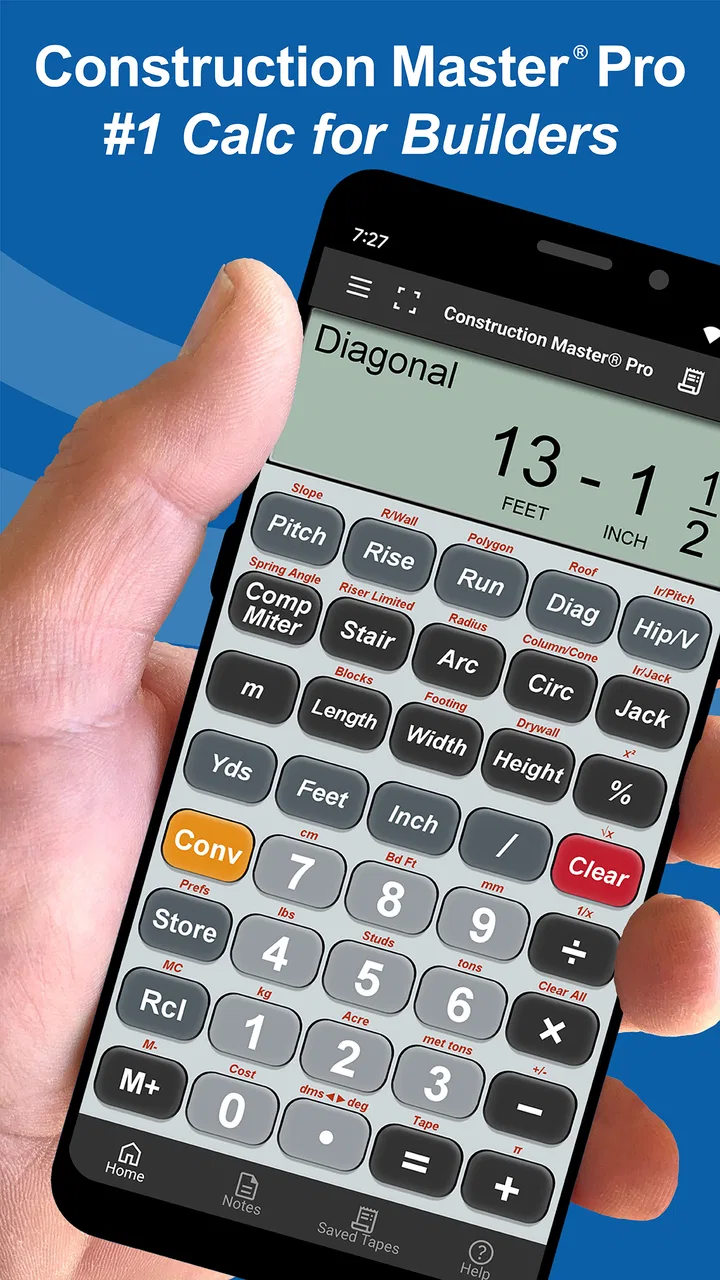
When I use a construction calculator, I do not want to translate every measurement into decimal form before I can trust the result. That is where Construction Master Pro Calc makes its strongest case. It is a tools app from Calculated Industries built around feet-and-inch fractions, so the central experience feels closer to a dedicated construction calculator than to a general phone calculator. I can enter the kind of measurements that appear on a tape measure, work with fractions, and keep the calculation in a form that makes sense on a job.
That focus matters more than it may sound. A regular calculator is fine for simple addition, but construction work often involves mixed units, repeated dimensions, slopes, material quantities, and results that need to be read quickly. The app is designed for those moments, covering practical areas such as framing, roofing, slope, and concrete. In my experience, its value comes less from doing spectacular mathematics and more from removing small conversion steps that create avoidable mistakes.
The app is free to install and is rated for Everyone. It has been available since December 13, 2010, and its current version is 10.20.18 with a minimum operating system requirement of 12. That long presence helps explain why it feels like a specialized utility rather than a newly assembled collection of generic calculator buttons. Its average rating is 4.7 from around 10 thousand ratings, and it has passed 100 thousand installs, which gives me useful context when deciding whether it is worth trying for occasional work.
You May Also Like

 Blood Strike: 2.5 Anniversary
Blood Strike’s Loadouts Turn Every Drop Into a Tactical Gamble
A close look at Blood Strike’s custom loadouts: how fast access to signature weapons reshapes its battle royale rhythm, rewards preparation, and narrows the gap between fights.

 Pandora - Music & Podcasts
Pandora’s Music Is Easy to Start, but Harder to Recover
Pandora’s strength is its low-effort path from a seed to a station. Its weak spot is how much confidence it asks you to place in connection, setup, and quiet recovery.

 8 Ball Pool
 Is Built on Rivalries, Rematches, and Routine
A close look at the rivalries, rematches, shared routines, and unanswered safety questions that turn a quick pool match into a persistent mobile community.

 Samsung Music
’s Quiet Strength Is Playing What You Already Own
Its reach comes less from spectacle than from dependable access to a personal library. That simplicity is both the app’s strongest retention engine and its ceiling.

 AccuWeather: Weather Radar
AccuWeather Review: A Quick, Clear Forecast for Everyday Decisions
For everyday plans, the best forecast is the one you can understand quickly. AccuWeather makes rain timing, radar, and local conditions easy to act on, with a few trade-offs.

 Hill Climb Racing
Why Hill Climb Racing Still Turns Crashes Into One More Run
A tiny car, a bumpy hill and one more upgrade: Hill Climb Racing keeps resurfacing because its simple chaos makes every near-miss feel personal.
More From Our News Desk



Feet, inches, and fractions are the real reason to use it
The most important capability is the way the calculator handles construction-style dimensions. If I measure a piece of timber as a number of feet, inches, and a fraction, I can keep that format instead of converting it to a decimal and later converting the answer back. That makes the result easier to compare with a plan, a tape measure, or a mark already made on a board.
This is especially useful when several dimensions are combined. Imagine checking the total length of a run made from multiple sections, allowing for a cut, or estimating the distance between framing points. With an ordinary calculator, I would need to decide how to represent every fraction first. A decimal entry may be mathematically valid, but it is not always the easiest form to verify visually. Here, the measurement language stays closer to the way the work is actually discussed.
I also like the practical effect on mental workload. The app does not make a measurement correct simply because it is specialized; I still need to enter the values carefully and understand the job. But it reduces the number of times I have to pause and ask whether a decimal represents the fraction I intended. That is a small improvement during a quiet estimate and a much bigger one when I am standing beside materials, checking dimensions quickly.
The same idea carries into slope and material-related calculations. A roof or ramp calculation is not just an abstract equation when the answer has to guide a cut or an estimate. Keeping the inputs and outputs in familiar construction terms helps me inspect the result before acting on it. If the answer looks surprising, I can revisit the dimensions in a format I recognize rather than debugging a chain of conversions.
What changes when I use it on a real task
My preferred workflow is to measure first, enter the values without mentally converting them, and then check the displayed result against the physical situation. For a framing task, I might use it to total several lengths, account for an opening, and estimate how much stock is needed. For roofing, I would use the slope-oriented calculations as a planning aid, then compare the outcome with the roof layout and the material instructions before ordering or cutting anything.
That last step is important. I treat the app as a calculation aid, not as a substitute for reading plans, checking local requirements, or confirming the conventions used by a particular trade. A calculator can process the numbers I give it, but it cannot notice that I measured from the wrong edge or used an inside dimension where an outside dimension was needed. The best result comes from combining the app’s convenient input style with ordinary site discipline.
One useful habit is to keep a written note of the original measurements beside the phone while working. If I only look at the final answer, it is easy to forget which dimension was entered or whether an allowance was included. Recording the inputs makes the calculation easier to audit later, particularly when several similar rooms, walls, or roof sections are involved.
Another practical tip is to separate estimating from final verification. I can use the calculator early to compare options, such as different framing layouts or approximate concrete quantities. Once the design is settled, I would repeat the calculation from the final drawing rather than relying on a rough figure created during the first discussion. This is not a weakness unique to the app; it is simply the difference between a quick working estimate and a number ready to guide a purchase.
The app’s construction orientation also changes how I think about phone use. A general calculator is usually built for short arithmetic, while this one earns its place when a calculation is tied to a physical dimension. I would not open it for splitting a restaurant bill or checking a percentage. I open it when the answer needs to remain connected to feet, inches, fractions, slope, framing, roofing, or concrete.
The strongest everyday scenario: checking a small job without carrying another calculator
The clearest use case for me is a small renovation or repair where I am moving between a tape measure, a sketch, and a phone. Suppose I am checking a wall that needs new framing around an opening. I can record the measured sections, add them in construction units, and compare the total with the length of material available. If the layout changes, I can adjust one dimension without rebuilding a decimal conversion by hand.
That workflow is useful for a homeowner who does careful work, but it is even more natural for a contractor, carpenter, roofer, estimator, or apprentice who repeatedly sees mixed measurements. The phone is already close at hand, and the specialized input style means fewer translation steps. For a person who only occasionally measures a shelf or calculates a single area, the advantage is much smaller.
Concrete planning is another situation where I find the focused approach helpful. I can use dimensions for a slab, footing, or other rectangular section as part of an estimate, then compare the result with the supplier’s guidance and the planned allowance. The app can make the arithmetic less awkward, but it does not know the actual depth variation, waste, site conditions, or delivery constraints. I would never treat a first calculation as an exact order without checking those details.
Roof work shows a similar trade-off. Slope calculations can help me understand the relationship between rise, run, and the resulting geometry, which is valuable when planning or checking a measurement. However, a roof is rarely just a clean mathematical shape. Valleys, hips, overhangs, penetrations, and waste affect the real material requirement. The app is strongest for the calculation inside the workflow, not for replacing a complete roofing takeoff.
Where it is better than a normal calculator, and where it is not
The usual alternative is the calculator already installed on a phone. That option wins for speed when the task is ordinary arithmetic, and it avoids learning a specialized interface. If I only need to multiply two decimal values, I would probably use the standard calculator. The construction app becomes more convincing when the input itself is the problem: fractions, feet-and-inch notation, slope relationships, or trade-specific quantities.
A spreadsheet is better when I need a visible record of many line items, formulas, notes, and revisions. I can organize a full estimate in a spreadsheet in a way a pocket calculator cannot match. On the other hand, a spreadsheet often asks me to build or maintain the unit logic myself. For a quick on-site calculation, that preparation can be more work than the calculation. I see this app as a companion to a spreadsheet, not a replacement for one.
A dedicated handheld construction calculator may still be preferable for someone who works all day in dusty, wet, or physically demanding conditions. A phone can be less comfortable to operate with gloves, and its screen may be harder to read in bright light. A handheld device also keeps the tool separate from notifications and other distractions. The app’s advantage is convenience and availability, especially for people who do not want to carry another device.
There is also a learning curve. The app is specialized enough that a first-time user may need to understand what each calculation is intended to represent rather than pressing familiar arithmetic buttons. I would not recommend opening it for the first time moments before an important cut and assuming every result is self-explanatory. A short practice session with known measurements is a sensible way to become comfortable with the input and output style.
The free entry point makes experimenting easier, but the presence of in-app purchases means that some parts of the experience may involve optional paid items. Those purchases range from less than a dollar to around forty dollars per item. I would check the purchase screen carefully before committing, especially if I only need occasional calculations. For a frequent trade user, a paid addition may be reasonable; for a casual user, the free portion may be all that is needed.
Small details that improve accuracy in practice
My first recommendation is to use a consistent measurement convention throughout one calculation. Do not enter one dimension as an outside length, another as a clear opening, and a third as a center-to-center distance unless that difference is intentional. The app can handle the arithmetic, but consistency is what makes the arithmetic meaningful.
Second, I would use it to test sensitivity rather than produce only one answer. If a concrete depth is uncertain, or a roof measurement is approximate, I can run the calculation with the lower and higher reasonable values. The range tells me more than a single apparently precise number. This is one of the best ways to avoid giving the display more confidence than the measurements deserve.
Third, I would keep allowances visible instead of burying them in a final total. For materials, it is useful to know the calculated requirement and the added allowance separately. That makes it easier to revise the estimate if the waste assumption changes. A specialized calculator can speed up the arithmetic, but clear notes around the arithmetic are what preserve the reasoning.
Fourth, I would verify unusual results by reversing the calculation where practical. If I calculate a total from several dimensions, I can check whether subtracting the known sections returns the expected remainder. This simple reverse check is particularly useful when working quickly or when a fraction was entered incorrectly.
These habits reveal the app’s real strength: it supports a disciplined workflow without forcing me to translate every value into a less familiar format. It does not remove the need for judgment, but it gives that judgment cleaner numbers to work with.
Who will get the most from it
I think the best audience is anyone who regularly handles construction measurements but does not always carry a dedicated calculator. A framing professional can benefit from quick length and layout checks. A roofer can use the slope-related work as part of planning. A concrete worker or estimator can use it for early quantity calculations. An apprentice can use it to practice the relationship between measurements while staying in the units used on the job.
It is also a good fit for a careful homeowner managing a renovation, provided that person is willing to learn the tool and verify the result. The app can make a homeowner less dependent on rough mental estimates, particularly when a project includes several fractional dimensions. I would still encourage professional review for structural, safety-critical, or permit-related work.
I would skip it if my needs are limited to basic arithmetic, if I require a full project estimating system, or if I need extensive documentation and collaboration inside the same tool. It is not the right choice for someone looking for a general-purpose spreadsheet, a drawing package, or a complete materials-management workflow. Its usefulness comes from being focused, and that focus naturally leaves other jobs to other apps.
Device compatibility is worth checking before installing because the app requires operating system version 12 or later. For supported devices, the free download lowers the barrier to trying it, while the Everyone content rating makes it broadly accessible. The developer is Calculated Industries, a name associated here with a calculator designed around trade measurements rather than a general consumer utility.
My recommendation after using it as a working tool
I recommend Construction Master Pro Calc when the main frustration is converting feet, inches, and fractions before doing otherwise simple construction math. That is the capability that changes the experience, and it has a real effect: fewer manual conversions, easier visual checking, and results that remain connected to the measurements in front of me.
I would approach it with realistic expectations. It can make a framing, roofing, slope, or concrete calculation more convenient, but it cannot validate a measurement, interpret a complicated plan, or account for every field condition. The most reliable workflow is to enter consistent measurements, keep the assumptions visible, test uncertain ranges, and verify important results independently.
For occasional users, the free version is a practical way to find out whether a specialized construction calculator fits their habits. For frequent users, the optional purchases deserve a careful look because the value depends on which parts of the tool are needed. Either way, the app earns consideration because it solves a specific problem well rather than pretending to replace every tool in a builder’s kit.
My final view is simple: if you think in ordinary decimal numbers and rarely work with construction dimensions, your phone’s standard calculator may be easier. If you regularly read a tape measure, check slopes, total framing lengths, estimate concrete, or review roofing dimensions, this app is much closer to the way you already work. Its best feature is not complexity; it is keeping construction measurements understandable from entry to result.
FAQs for Construction Master Pro Calc
01What is Construction Master Pro Calc used for?
Construction Master Pro Calc is a specialized calculator designed for builders, contractors, architects, engineers, and DIY users. It helps with practical construction calculations such as areas, volumes, dimensions, right triangles, stair layouts, roof pitches, and material estimates. Its main advantage is that it works with feet, inches, fractions, and metric measurements, reducing the need for manual conversions during everyday projects.
02Is Construction Master Pro Calc suitable for beginners?
Yes, beginners can use Construction Master Pro Calc, although it may take some time to understand all of its functions. The app is more advanced than a standard calculator and is aimed primarily at construction-related work. New users should start with simple length, area, and fraction calculations before exploring stair, roof, and advanced dimensional features. Carefully checking entered measurements is still essential.
03Does the app support feet, inches, fractions, and metric measurements?
One of the most useful features of Construction Master Pro Calc is its support for construction-friendly measurement formats. You can work with feet and inches, including fractional inches, instead of converting everything into decimals first. The calculator also supports metric calculations, making it practical for users working with different measurement systems or switching between imperial and metric plans.
04Can Construction Master Pro Calc calculate stairs, roofs, and right triangles?
Yes, the app is designed to handle several calculations commonly required on construction sites. Depending on the selected function, it can assist with right-triangle dimensions, roof pitch and slope calculations, stair layout measurements, areas, volumes, and other building-related problems. These tools can save time, but results should always be compared with project plans, local building codes, and professional calculations.
05Is Construction Master Pro Calc free, and does it work offline?
Construction Master Pro Calc is generally offered as a paid professional calculator rather than a typical free utility app, although pricing and availability may vary between Android and iOS stores. Its core calculations are intended to work without a constant internet connection, which is convenient on job sites. Before downloading, check the current store listing for the exact price, supported device versions, and any purchase conditions.
Pros
- Includes many construction-specific formulas and conversion tools.
- Helps reduce manual calculations on job sites and during project planning.
- Supports calculations for areas
- volumes
- angles
- and material quantities.
- Useful reference for builders
- contractors
- engineers
- and DIY renovators.
- Works as a compact toolkit instead of requiring several separate calculators.
Cons
- Its specialized interface may feel overwhelming to occasional DIY users.
- Some results still require accurate field measurements and professional judgment.
- The app may be less useful for users needing only basic arithmetic functions.
- Older devices may show limited compatibility or a less comfortable layout.
- Advanced construction terminology can make certain tools harder to understand.

Construction Master Pro Calc
Gallery